

SECURE PAYMENTS: Ultimate way to pay Urban Utilities? Use Sniip!
Updated 8 April, 2024 - you can pay Urban Utilities with Sniip using the BPAY Biller Code & Reference Number on your bill.
- Process your Queensland Urban Utilities bill payment through Sniip.
- Use any payment method (including Amex and other credit cards) & earn full rewards.
- Set up easy Urban Utilities direct debit payments.
Simply scan or enter the BPAY Biller Code & Reference Number into the Sniip app!
Sniip - the ultimate #1 way to pay Urban Utilities since 2016.
Learn more

Pay the way you want (and earn points)


Pay Urban Utilities with Sniip
Urban Utilities Pay Bill
Since 2016, Sniip has been the ultimate and trusted way for Queenslanders to make their Urban Utilities bill payments.
Additionally, you can pay with any payment method (incl. American Express card and earn full credit card points on every Urban Utilities payment).
Ready to get started? All you need to do is scan/manually add the BPAY Code and Reference Number on your Urban Utilities bill using the Sniip app.
No more typing in lengthy numbers or worrying about making errors during your Urban Utilities payment process. In contrast, if you receive your Urban Utilities bills via email, you can simply share the Urban Utilities bill PDF directly into the Sniip app, and we'll take care of the rest.
There is no better way to pay your Urban Utilities bill than with Sniip. Trusted by more than 100,000 Australians and growing everyday.
All in all, it's a hassle-free experience that saves you time and ensures your Queensland Urban Utilities bills are paid on time, every time - with Sniip!

What is Urban Utilities?
Pay Urban UtilitiesUrban Utilities is a council-owned, Australian utility company that provides essential services of bulk water (drinking water, recycled water and sewerage services) to five local government areas in South East Queensland, Australia.
In brief, Urban Utilities is a statutory authority, controlled by local government shareholders made up of Brisbane, Ipswich, Lockyer Valley, Scenic Rim, and Somerset councils (mapping pictured right). It's governed by an independent board.
To clarify, Seqwater is the Queensland Government Statutory Authority responsible for catchment, storage, transport and treatment of bulk drinking water. So, it's actually Seqwater that sells water to council-owned water distributors including Urban Utilities, Unitywater (Sunshine Coast and Moreton Bay), Redland City Council, Gold Coast City Council and Logan City Council.
Automatically Import Bills
Urban Utilities Pay Bill
When you receive your next email with an Urban Utilities bill, you can have it set to automatically import in the Sniip app.
Now, you can schedule or pay your bill in seconds! You'll receive a notification from Sniip when a new bill arrives in the app.
You can set up auto-import by doing the following:
- Tap the menu icon in the top left corner.
- Select ‘Import from email’.
- From here, choose your email provider and enter the email address you’d like your bills imported from.
- Tap ‘Continue’ and follow the prompts to connect your email address.
Email bill: Urban Utilities Login Portal
Urban Utilities Pay Bill
- Open the email received from Urban Utilities and tap, 'View bill'
- Then, enter your postcode when prompted and then your bill will open
- Lastly, tap the 'share' icon button, then select Sniip where your bill will be ready for payment
Add your paper Urban Utilities bill to Sniip
Urban Utilities Pay Bill
- Grab your paper bill and open/login to the Sniip app on your mobile
- Select the '+' button in the top right corner of the Sniip app
- Tap 'Scan any bill' and hover your camera over the BPAY Biller Code and Reference Number on your bill (the exact same way you'd scan a QR code)
Paper bill: Add your paper Urban Utilities bill to Sniip app
Urban Utilities Pay Bill
- Grab your paper bill and open/login to the Sniip app on your mobile
- Then, select the '+' button in the top right corner of the Sniip app
- Finally, tap 'Scan any bill' and hover your camera over the BPAY Biller Code and Reference Number on your bill (the exact same way you'd scan a QR code)
Photo of bill: Import bill from camera roll
Urban Utilities Pay Bill
- Open the email received from Urban Utilities to access your bill
- Then, take a screenshot of the second page of the bill that displays the BPAY Code and Reference Number
- Lastly, open the Sniip app and import the bill screenshot from your camera roll, ready for payment (you can pay Urban Utilities with any credit card or other payment method via Sniip)
How to manually add your Urban Utilities bill to Sniip
Urban Utilities Pay Bill
- Open the Sniip app and tap on the '+' icon in the top right corner
- Select 'Add bill manually' and enter the Urban Utilities BPAY Code (112144)
- Enter your bill details to schedule or pay the bill through Sniip
How to manually add your Urban Utilities bill to Sniip
Urban Utilities Pay Bill
- Open the Sniip app and tap on the '+' icon in the top right corner
- Then, select 'Add bill manually' and enter the Urban Utilities BPAY Code (112144)
- Finally, enter your bill details to schedule or pay the bill through Sniip (you can pay Urban Utilities with any credit card or other payment method via Sniip)
Frequently asked questions
Urban Utilities Pay Bill
Recurring Payments/Urban Utilities Direct Debit

Step 1
Add your Urban Utilities bill to the Sniip app and tap 'Schedule'
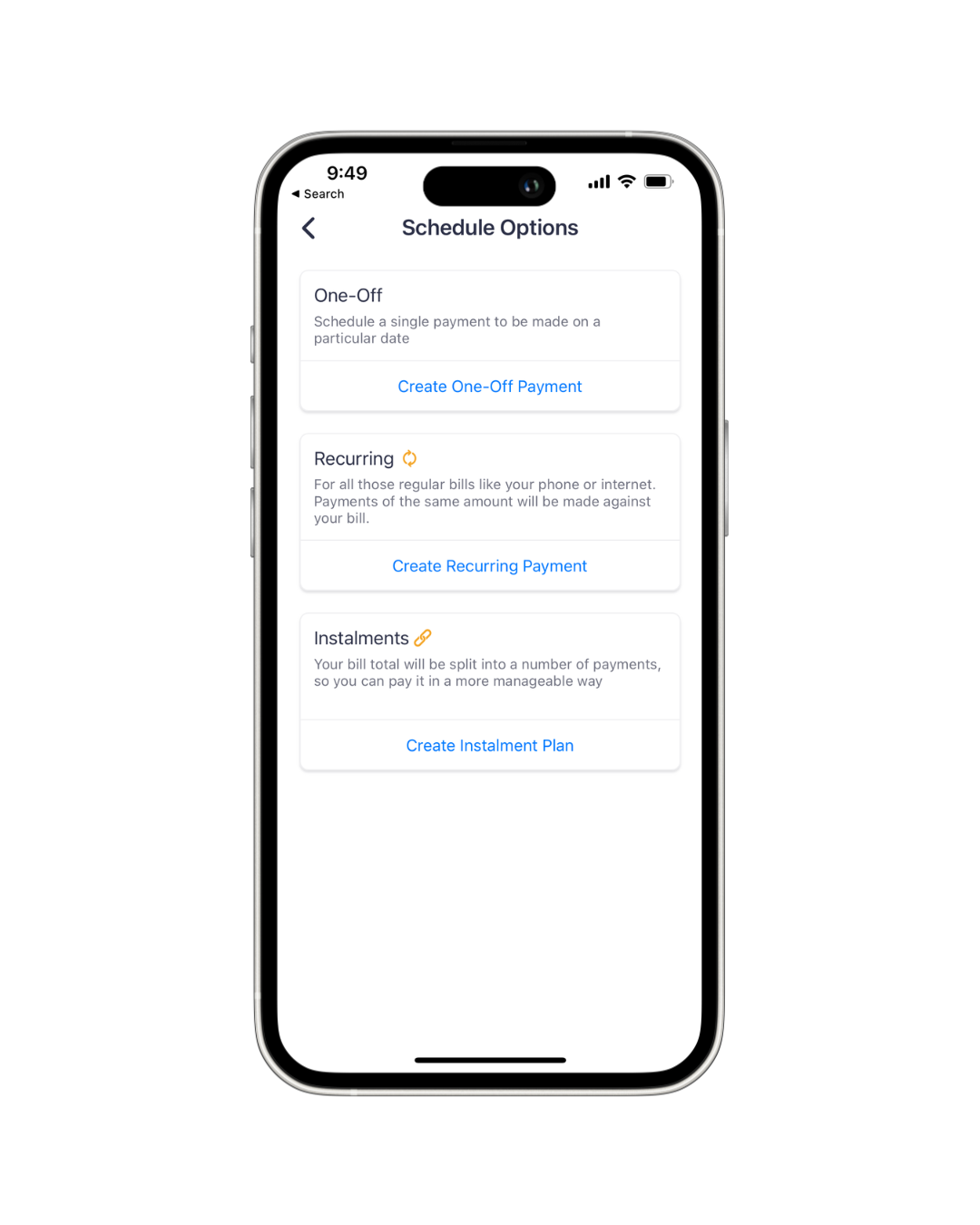
Step 2
Tap 'Create Recurring Payment'

Step 3
Set the criteria for your recurring payments

Step 4
Choose your payment method

Step 5
Confirm the recurring payment details and you're good to go!
It's that easy to pay your Urban Utilities the ultimate way with Sniip!
Download SniipHave a question? You can contact Brisbane-based Sniip Support - our phone number, (07) 3268 7710.

Discover Sniip
specifically in fact
still in general
straightaway in light of
subsequently in like fashion
surely in like manner
surprisingly in order that
than in order to
then in other words
thereafter in particular
therefore in reality
thereupon in short
thirdly in similar fashion
though in spite of
thus in sum
till in summary
undeniably in that case
undoubtedly in the event that
unless in the final analysis
unlike in the first place
unquestionably in the fourth place
until in the hope that
