
Afterpay bills with afterpay plus via the sniip app. $0 download fees and $0 monthly fees.
Afterpay your bills
Use Afterpay Plus and Sniip to pay bills in 4 payments.
The Sniip app is the easiest and most convenient tool to help you Afterpay bill payments using Afterpay Plus.
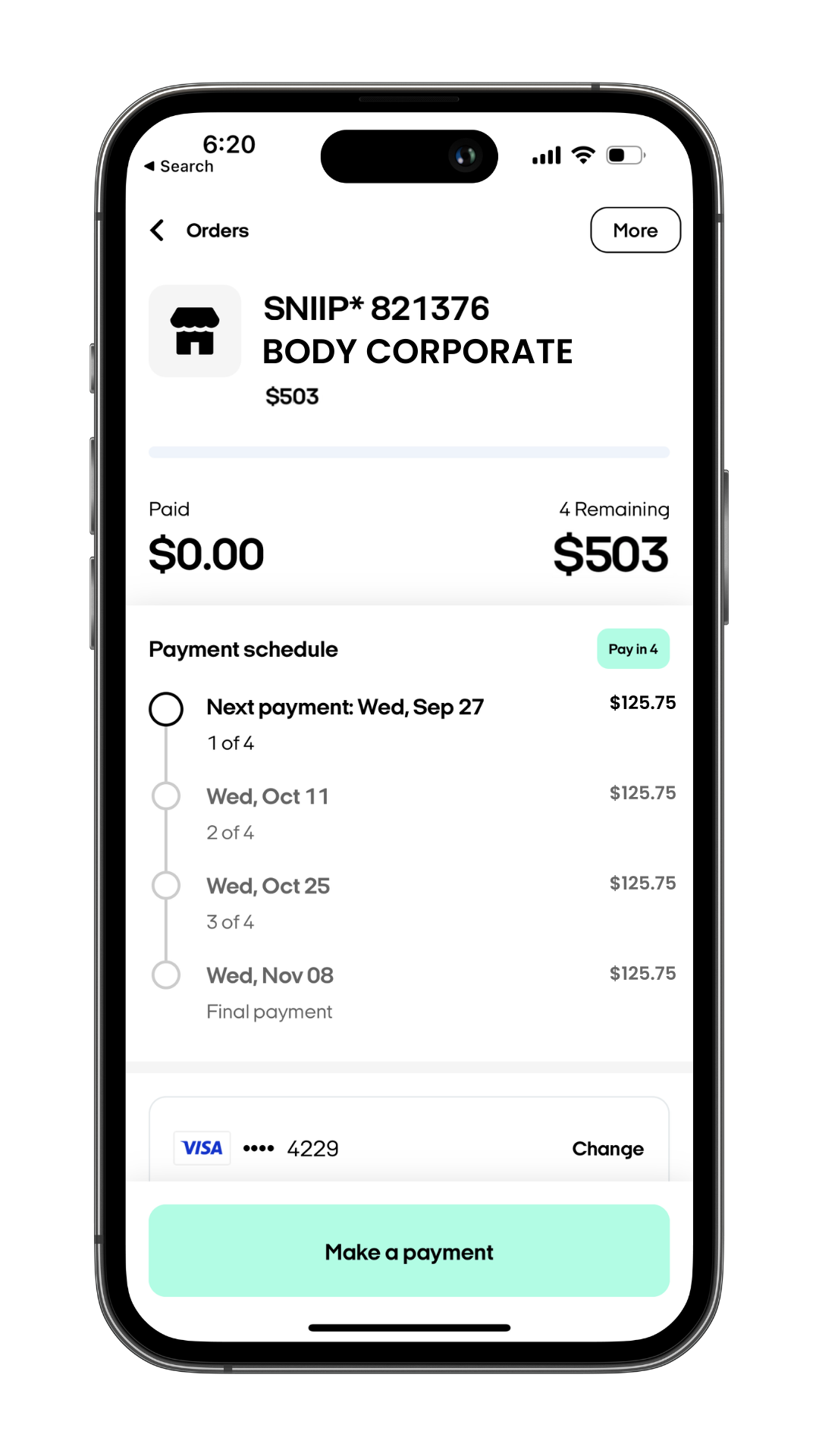
Pay bills in 4 payments
Gain access to an additional 60,000+ BPAY bills you can pay in 4 payments. Afterpay all of your bills, from ATO payments, school fees and insurance, to private health, utilities, phone bills and council rates. Start making your life easier today.
Enter your mobile number and we'll text you a link to download the app.
How it works
Get AfterPay Plus
Download Afterpay and add an Afterpay Plus card to your Apple or Google wallet for just $9.99 per month.
Explore Afterpay PlusDownload Sniip
Free download and $0 monthly fees. Simply create an account, upload your bill, and use your digital wallet to pay with your Afterpay Plus card.
Download SniipAll done!
You're all set to pay bills in 4 payments. Pay household bills like rent, utilities, rates, insurance, car registration, tax and more!
Pay bills with AfterpayHow to pay a BPAY bill with Afterpay Plus
It’s simple. Follow these steps:
- Tap the ‘Bills to pay’ option at your home screen.
- Select the BPAY bill you would like to pay with Afterpay Plus.
- Tap on the ‘Pay’ button located in the down right corner in the Bill details screen.
- From there, tap on at the last option that says ‘Apple Pay’.
- Then, choose the ‘Visa/Mastercard’ option.
- You are almost there! Tap on the ‘Pay with Apple Pay’ button at the bottom of your screen.
- Select ‘Change Payment Method’ followed by tapping on your Afterpay Plus card from your wallet.
- Double-Click the side button of your iPhone to complete transaction.
Excellent! you just made your first BPAY payment with Afterplay Plus using Sniip.
Looking for non-BPAY bill to pay with Afterpay Plus?
We got you covered. We will guide you through it with the next steps:
- Locate the ‘Bills to pay’ option at your home screen.
- Tap the non BPAY bill you would like to pay with Afterpay Plus.
- Select on the ‘Pay’ button located in the bottom right corner in the Bill details screen.
- Now, tap on at the last option that says ‘Apple Pay’.
- To continue, choose the ‘Visa/Mastercard’ option.
- Tap on the ‘Pay with Apple Pay’ button at the bottom of your screen.
- Select ‘Change Payment Method’ followed by tapping on your Afterpay Plus card from your wallet.
- Double-Click the side button of your iPhone to complete transaction.
Your non BPAY bill has never been easier to pay with Afterpay Plus thanks to Sniip!
Looking for non-BPAY bill to pay with Afterpay Plus?
We got you covered. We will guide you through it with the next steps:
- Locate the ‘Bills to pay’ option at your home screen.
- Tap the non BPAY bill you would like to pay with Afterpay Plus.
- Select on the ‘Pay’ button located in the bottom right corner in the Bill details screen.
- Now, tap on at the last option that says ‘Apple Pay’.
- To continue, choose the ‘Visa/Mastercard’ option.
- Tap on the ‘Pay with Apple Pay’ button at the bottom of your screen.
- Select ‘Change Payment Method’ followed by tapping on your Afterpay Plus card from your wallet.
- Double-Click the side button of your iPhone to complete transaction.
Your non BPAY bill has never been easier to pay with Afterpay Plus thanks to Sniip!
How to pay a bill with Afterpay Plus using Google Pay
Just follow these simple steps:
- Tap the ‘Bills to pay’ option at your home screen.
- Select the bill you would like to pay with Afterpay Plus.
- Tap on the ‘Pay’ button located in the down right corner in the Bill details screen.
- From there, tap on at the last option that says ‘Google Pay’.
- Then, choose the ‘Visa/Mastercard’ option.
- You are almost there! Tap on the ‘Pay with Google Pay’ button at the bottom of your screen.
- Select ‘Change Payment Method’ followed by tapping on your Afterpay Plus card from your wallet.
- Double-Click the side button of your iPhone to complete transaction.





Step-by-Step guide
We’ve got you covered. Follow the step-by-step process down bellow:

Here's why you should download Sniip today
Discover other options to pay bills in 4 payments
Don't want to use Afterpay Plus to pay bills in 4 payments? That's fine!
You can explore other ways to pay bills in 4 payments via the Sniip app below.
Discover more optionsaltogether although this may be true
another another key point
basically as a matter of fact
because as a result
before as an illustration
besides as can be seen
but as has been noted
certainly as I have noted
chiefly as I have said
comparatively as I have shown
concurrently as long as
consequently as much as
contrarily as shown above
conversely as soon as
correspondingly as well as
despite at any rate
doubtedly at first
during at last
e.g. at least
earlier at length
emphatically at the present time
equally at the same time
especially at this instant
eventually at this point
evidently at this time
explicitly balanced against
finally being that
firstly by all means
following by and large
formerly by comparison
forthwith by the same token
fourthly by the time
further compared to
furthermore be that as it may
generally coupled with
hence different from
henceforth due to
however equally important
i.e. even if
identically even more
indeed even so
instead even though
last first thing to remember
lastly for example
later for fear that
lest for instance
likewise for one thing
markedly for that reason
meanwhile for the most part
moreover for the purpose of
nevertheless for the same reason
nonetheless for this purpose
nor for this reason
notwithstanding from time to time
obviously given that
occasionally given these points
otherwise important to realize
once once in a while
overall in a word
